

Valid Observability-Self-Hosted-Fundamentals Test Answers & SolarWinds Observability-Self-Hosted-Fundamentals Exam PDF
SolarWinds Observability-Self-Hosted-Fundamentals Certification Real 2026 Mock Exam
NEW QUESTION # 31
Alerts A and B were assigned the same trigger action through the action manager. What describes what happens when the action is modified while editing alert A's configuration?
- A. alert B is automatically updated
- B. alert B is unaffected by modification
- C. modification is unable to be saved
- D. trigger action is updated in manager
Answer: D
Explanation:
The SolarWinds Platform utilizes a centralizedAction Managerto handle alert notifications and remediations efficiently. According to theSolarWinds Platform Alerting Guide, alert actions (such as sending an email, executing a script, or posting to a Slack channel) are often treated as reusable objects. When multiple alerts (Alert A and Alert B) share the same action from the Action Manager, they are essentially pointing to a single configuration entry in the database.
If an administrator edits Alert A and modifies the parameters of that shared trigger action, the change is not isolated to just that alert's workflow. Instead, thetrigger action is updated in the manager. Because Alert B is linked to that same action ID, it will immediately reflect the updated configuration the next time it triggers.
This behavior is designed to simplify administration; for example, if a primary on-call email address changes, an admin only needs to update the action once rather than editing every individual alert. However, it requires caution: if a user intended to change the action for Alert A only, they should instead "Copy" the action or create a new one to avoid inadvertently altering the behavior of Alert B and all other alerts sharing that centralized action.
NEW QUESTION # 32
What is the minimum supported version for SolarWinds Hybrid Cloud Observability (HCO) database server?
- A. MS SQL server 2016 service pack 1
- B. SQL server 2012 service pack 4
- C. MS SQL server 2012 R2
- D. MS SQL server 2019
Answer: D
Explanation:
The transition from the legacy Orion Platform toHybrid Cloud Observability (HCO)introduced stricter hardware and software prerequisites to support modern features like AIOps, advanced mapping, and high- performance data processing. According to theSolarWinds Hybrid Cloud Observability System Requirements, the platform requires modern SQL features for optimal performance.
While legacy versions of the Orion Platform may have supported SQL Server 2016 or even 2012 in older iterations,MS SQL Server 2019is identified as theminimum supported versionfor new HCO installations.
This requirement ensures compatibility with the latest database indexing and query optimization techniques used by the SolarWinds Platform to handle the high volume of time-series data generated by observability nodes. Additionally, using SQL 2019 or later (including SQL 2022) is necessary to ensure the platform can utilize specific security protocols and memory management improvements that are not available in the end-of- life SQL 2012 or SP1 versions of 2016.
NEW QUESTION # 33
What two of the following reasons apply to creating custom views in SolarWinds' web console? (Choose two.)
- A. personalize user experience and focus on specific elements
- B. limit user access to specific elements
- C. monitor devices and elements not shown in default views
- D. perform customizations with SQL queries
Answer: A,B
Explanation:
Custom Views(Summary Views and Detail Views) are the primary way administrators control the layout and focus of the SolarWinds Web Console. According to theSolarWinds Platform Administrator Guide, views are used to tailor the platform to different user roles.
The two primary reasons for creating them are:
* Limit user access to specific elements (A): Views can be restricted to specific users or groups. By creating a custom view that only contains "Storage" widgets and assigning it to the Storage Team, an administrator can effectively limit what those users see when they log in. This prevents users from being overwhelmed by irrelevant data and acts as a functional layer of access control.
* Personalize user experience and focus on specific elements (D): Different roles require different data. A CXO might need a high-level "Map" and "SLA Trend" view, while a technician needs a "Top
10 Nodes by CPU" and "Active Alerts" view. Custom views allow the administrator to curate exactly which widgets are visible, ensuring that each user has the most relevant information for their job front- and-center.
SQL customizations(Option C) are a method of building widgets, but not thereasonfor the view itself.
Monitoring new elements (Option B) is handled through theAdd NodeandPollerssettings; a view onlydisplays what is already being monitored.
NEW QUESTION # 34
What is the effect of checking the Encrypt connections with SSL box in the configuration wizard?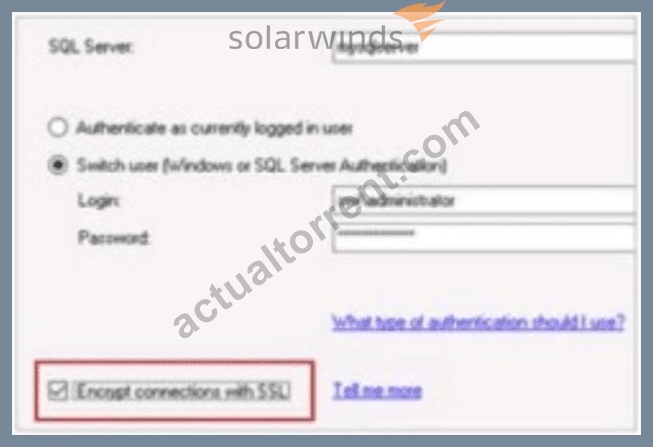
- A. The network data between SolarWinds' Hybrid Cloud Observability Platform server and the SQL server will be encrypted.
- B. The login account to access the SQL server will be encrypted and stored in SolarWinds' Hybrid Cloud Observability Platform server.
- C. The installed SolarWinds product will use the login account to access the databases on the SQL server.
- D. The login credentials will be encrypted between SolarWinds' Hybrid Cloud Observability Platform server and the SQL server while in transit.
Answer: A
Explanation:
According to theSolarWinds Platformconfiguration documentation, the option toEncrypt connections with SSLduring the database configuration wizard specifically dictates the security level of the communication channel between the application server and the database backend. When this box is checked, the platform ensures thatthe network data between SolarWinds' Hybrid Cloud Observability Platform server and the SQL server will be encrypted. This security measure is critical for protecting the integrity and confidentiality of the performance metrics, configuration data, and credentials as they traverse the internal network between these two primary architectural components.
This encryption utilizesTransport Layer Security (TLS)to wrap theTDS (Tabular Data Stream)protocol used by Microsoft SQL Server. By enabling this feature, the platform prevents potential "man-in-the-middle" attacks where an adversary could sniff network traffic to intercept sensitive monitoring data or administrative information stored within the SQL database. It is important to note that for this setting to function correctly, theSQL Servermust be configured with a valid SSL/TLS certificate that is trusted by the SolarWinds application server.
This setting differs from simple credential encryption (Option C) or secure storage (Option B) because it applies toall datatransmitted during the session, not just the initial login exchange. Furthermore, while the configuration wizard does require a login account (Option A), that account's specific permissions are a separate functional requirement from the underlying encryption of the transport layer. Enabling SSL encryption is a standard best practice for organizations following strict compliance frameworks likeHIPAA, PCI-DSS, orSOC2, where protecting data-in-transit is a mandatory requirement even on internal, "trusted" network segments. This centralized encryption toggle simplifies the deployment of high-security observability environments by orchestrating the secure connection parameters through the standard SolarWinds Configuration Wizard interface.
NEW QUESTION # 35
A non-administrator user reports they are unable to create Intelligent Maps in the web console. What is the reason for the block?
- A. user has not been given permission to add images
- B. user has not been given default set of user permissions
- C. user has not been given the manage views permission
- D. user has not been given the creator role in maps
Answer: A
Explanation:
The ability to create and manageIntelligent Mapsin the SolarWinds Platform is tied to a specific set of granular user permissions. While a user may have general rights to view the console, creating a map involves placing entities onto a canvas and, frequently, utilizing background images or custom icons. According to the SolarWinds Platform documentation on Map Management, a critical prerequisite for full map creation functionality is thepermission to add images (D).
In the user account settings underSettings > All Settings > Manage Accounts, there is a specific toggle for
"Allow Map Management" or "Allow Editing." However, if the underlying platform permission for "Add Images" is not enabled, the user will find the map creation wizard restricted or non-functional. This is because Intelligent Maps rely on the platform's shared image library to store the metadata and visual components of the map. Without the right to write to this library (Add Images), the user is blocked from saving new map definitions to the database. This permission is often disabled by default for standard users to prevent the web server's storage from being filled with unauthorized or non-work-related image files.
NEW QUESTION # 36
Which two of the following items are required to use Anomaly-Based Alerts in SolarWinds Hybrid Cloud Observability (HCO)? (Choose two.)
- A. advanced machine-learning feature
- B. Platform Connect
- C. internet connection
- D. AIOps and machine-learning module
Answer: A,B
Explanation:
Anomaly-Based Alertingis a premier feature of Hybrid Cloud Observability that moves beyond static thresholds to identify performance deviations based on historical behavior. According to theSolarWinds HCO Administrator Guide, this feature relies on cloud-assisted analytics to process complex datasets. To enable this, two specific components are required:
* Advanced Machine-Learning Feature: This is the functional logic within the HCO platform that identifies patterns and establishes "normal" baselines for metrics like CPU load or interface utilization.
* Platform Connect: This is the essential bridge that links the self-hosted HCO instance to the SolarWinds cloud-based AIOps engine. Because anomaly detection requires significant computational power to analyze long-term historical trends, the heavy processing is often offloaded. Platform Connect ensures that the necessary metadata can be analyzed securely to generate the dynamic thresholds used for these alerts.
WithoutPlatform Connect, the local server cannot access the machine-learning models required to calculate what constitutes an "anomaly" versus standard operational variance. This architecture allows HCO to provide high-level AIOps capabilities without requiring massive localized hardware for every installation.
NEW QUESTION # 37
Which two of the following settings can be included in an alert cluster? (Choose two.)
- A. metric values
- B. configuration
- C. device status
- D. audit events
Answer: A,D
Explanation:
AlertStackin Hybrid Cloud Observability (HCO) uses alert clusters to group related active alerts into a single actionable incident. According to theSolarWinds HCO Alertingdocumentation, these clusters are designed to provide context beyond the alert itself by correlating different types of data.
* Metric Values (D): Alert clusters include the specific performance data that triggered the alert, such as high CPU load percentages or interface latency values. This allows the administrator to see the "why" behind the incident immediately within the cluster view.
* Audit Events (A): To assist in root cause analysis, alert clusters can include relevant audit events. For example, if a node goes down immediately after a configuration change, the audit event showing who logged in and what they changed will be correlated within the cluster to provide a timeline of events leading to the alert.
While "device status" is often the result of an alert, the cluster is specifically built to aggregate the underlying metricsandevents(Audit/Events) to give a comprehensive picture of the environment's health.
NEW QUESTION # 38
Which statement defines the meaning of acknowledging an alert?
- A. The issue that triggered the alert is being worked on and will be escalated.
- B. The issue that triggered the alert has been resolved.
- C. The issue that triggered the alert is being worked on and will not be escalated.
- D. The issue that triggered the alert is being worked on.
Answer: C
Explanation:
In the SolarWinds alerting workflow, "Acknowledgment" is a critical state change that coordinates the human response to an incident. According to theSolarWinds Platform Alerting Guide, acknowledging an alert communicates to the rest of the team that a specific technician has taken ownership of the issue.
The formal definition of acknowledgment is thatthe issue is being worked on and the alert will not be escalated. This is the most important functional result of the action: it halts the automated escalation chain. If an alert was configured to email a manager after 30 minutes of inactivity, acknowledging the alert at the 15- minute mark cancels that pending manager email. It signals to the system-and other operators-that active troubleshooting is underway and further automated "noise" is unnecessary.
It is important to note that acknowledgmentdoes notmean the issue is resolved (Option A); the alert remains active in the "All Active Alerts" list (though often filtered into an "Acknowledged" category) until the underlying trigger condition is cleared by the monitoring engine. It is a procedural tool for incident management, ensuring that once a human engages with a problem, the platform's automated notification logic steps aside to let them work without further distraction.
NEW QUESTION # 39
A network discovery job was performed. The job was not correctly defined and not all devices were discovered within the network. What is the likely reason for the skipped devices?
- A. The preferred polling method in the discovery job was set to WML
- B. The network discovery timeout was too short
- C. The missing devices were configured for SNPMvS.
- D. The missing devices were included in the discovery ignore list.
Answer: D
Explanation:
Network Discovery is an automated process to scan subnets and import new infrastructure. However, the discovery engine includes logic to prevent duplicate entries and ignore non-relevant assets. According to the SolarWinds Platform Administrator Guide, if specific devices are missing from the results, the most common administrative cause is theDiscovery Ignore List.
The "Ignore List" is a database of IP addresses or MAC addresses that the platform has been explicitly told to skip. This often happens if a device was previously discovered but the administrator chose "Ignore this node" during the import phase. The system remembers this choice to prevent the device from reappearing in every subsequent scan. Additionally, the platform automatically ignores any node that isalready presentin the
"Manage Nodes" list to avoid creating redundant monitoring objects.
While a timeout (Option C) or incorrect polling method (Option D) could cause a node to fail to respond with its full metadata, the device would typically still appear in the discovery results as a "Generic" or "ICMP- only" device rather than being skipped entirely. Only theIgnore Listor pre-existing status causes a device to be excluded from the discovery results table during a scan of a valid subnet.
NEW QUESTION # 40
Which feature halts the alert escalation process?
- A. reset conditions
- B. trigger actions
- C. reset actions
- D. acknowledgement
Answer: D
Explanation:
Alert escalation in the SolarWinds Platform allows for a tiered response to critical issues (e.g., emailing a technician immediately, then emailing a manager if the issue persists for 30 minutes). According to the SolarWinds HCO Alerting Enginedocumentation, the primary mechanism for a human operator to pause this automated progression isacknowledgement.
When an active alert is acknowledged via the Web Console, several things happen:
* The alert is moved to the "Acknowledged" category, signaling to other team members that the issue is being addressed.
* The "Acknowledge" timestamp and the user's name are recorded.
* The escalation chain is halted.Any further actions defined in the "Escalation" tab of the alert configuration-which were scheduled to fire after a certain duration-are cancelled.
It is important to note that acknowledging an alert doesnotclear the alert or stop the "Reset Conditions" from being monitored. If the node stays down, the alert remains active, but no furthernewescalation emails will be sent. The alert will only truly disappear once the environment returns to a healthy state and the reset conditions are met.
NEW QUESTION # 41
A user is building a PerfStack project to troubleshoot an issue with an application. The user is unable to find data for the storage entities that the application accesses beyond application status. Which two of the following reasons explain this discrepancy? (Choose two.)
- A. storage entities may not have data during the specific time period
- B. amount of data to be displayed is too large
- C. product that collects the data is not installed
- D. account limitations restrict the user from accessing storage entities
Answer: C,D
Explanation:
PerfStackis a cross-stack data correlation tool, but its visibility is constrained by the underlying data collection modules and user security settings. According to thePerfStack Troubleshooting Guide, there are two primary reasons why specific entity data (like Storage) would be missing:
* Product Not Installed: Performance data for deep storage metrics (like LUN latency, Array IOPS, or Pool capacity) requires theStorage Resource Monitor (SRM)module or the equivalent HCO storage licensing tiers. If only Server & Application Monitor (SAM) is installed, the user will see the application status, but the specific storage back-end metrics will not be available for selection in the PerfStack pallet because the "collector" for that data doesn't exist.
* Account Limitations: SolarWinds usesAccount Limitationsto restrict user access to specific parts of the infrastructure. If a user account is limited to "Department = Sales" or "Vendor = Cisco," and the storage entities do not meet those criteria, those entities will be filtered out of the search results in PerfStack. Even if the data exists in the database, the platform security layer prevents the user from
"finding" or displaying it to ensure data privacy and multi-tenant security.
NEW QUESTION # 42
How are devices within a network that does not respond to SNMP or WMI, discovered and imported for monitoring?
- A. Include devices that only respond to ICMP in network discovery.
- B. Set a network hop value greater than 0 in the discovery settings.
- C. Increase the network discovery time out value.
- D. Select agent polling method in network discovery.
Answer: A
Explanation:
Network Discovery in the SolarWinds Platform is designed to identify as much infrastructure as possible, even if that infrastructure is "locked down." According to theSolarWinds Platform Administrator Guide, the discovery wizard follows a specific hierarchy of identification.
If a device hasSNMPorWMIdisabled (often the case for security-hardened servers, basic switches, or simple IP-enabled appliances), the platform cannot gather deep performance metrics like CPU or memory. However, the device can still be discovered and monitored for "Up/Down" availability using a simple Ping (ICMP). To ensure these devices are added to the database during a scan, the administrator must check the box to " Include devices that only respond to ICMP" during the discovery configuration. If this is not selected, the discovery engine will skip any IP address that does not provide a valid SNMP or WMI credential response, potentially leaving gaps in the network inventory. This is the standard method for monitoring "Ping-only" nodes.
NEW QUESTION # 43
A subset of the monitored devices is due for maintenance. These devices are expected to be shut down and restarted multiple times during maintenance. Which action should be taken to prevent the devices from triggering alerts during this period without impacting data collection?
- A. Unmanage devices during maintenance.
- B. Mute the devices during maintenance.
- C. Disable all alerts during maintenance.
- D. Make unreachable during maintenance.
Answer: B
Explanation:
SolarWinds provides several ways to handle maintenance windows, but they have different impacts on historical data. According to theSolarWinds Platform Administrator Guide, "Unmanaging" a node (Option D) stops all polling entirely, resulting in "gaps" in your historical charts.
To prevent notifications whilepreserving data collection, the best practice is toMute the devices during maintenance. When a device is "Muted" (also known as "Pause Actions"), the platform continues to poll the device and record its status and performance metrics (CPU, Memory, Latency) into the database. However, the alerting engine is instructed to suppress any notification actions (emails, scripts, etc.) for that specific entity. This ensures that you have a full historical record of the device's behavior during the maintenance period-showing exactly when it went down and came back up-without flooding the IT team with unnecessary alerts.
NEW QUESTION # 44
What is a benefit of polling devices with SolarWinds' Hybrid Cloud Observability (HCO) agent?
- A. communicates through singled fixed port data transmitted is encrypted
- B. polling reduces database load
- C. data is written directly into the database
Answer: A
Explanation:
The SolarWinds Agent provides a robust alternative to agentless polling (SNMP/WMI), particularly in restricted environments. According to theSolarWinds Platform Agent requirements and port information, the primary architectural benefit is its communication security and firewall-friendly nature.
When using an agent, communication is consolidated. Instead of requiring a wide range of dynamic ports for RPC (as with WMI) or multiple ports for various SNMP checks, the agentcommunicates through a single fixed port(typically TCP 17778 for agent-initiated or 17790 for server-initiated communication).
Furthermore, all traffic between the agent and the polling engine isencryptedusing 256-bit AES encryption.
This makes agents the ideal choice for monitoring:
* DMZ Servers: Where opening numerous ports back to the management network is a security violation.
* Cloud Instances (AWS/Azure): Where data must travel over public or semi-public links and requires encryption in transit.
* Remote Sites: Where NAT or strict firewall rules make traditional SNMP/WMI polling impossible.
Option B is incorrect because agents still report back to the Polling Engine (Orion Information Service), which then handles the database writes. Option C is incorrect as the agent actually increases the granularity of data collection, which may slightly increase database volume rather than reduce load.
NEW QUESTION # 45
From which two of the following locations can CPU load be excluded from contributing to overall node status? (Choose two.)
- A. node child status
- B. mute node
- C. edit node properties
- D. all nodes widget
Answer: A,C
Explanation:
By default, the "overall status" of a node (Up, Warning, Critical) is calculated based on its availability and the health of its child components, such as CPU and Memory. According to theSolarWinds Platform Node Managementdocumentation, administrators can fine-tune this rollup behavior to prevent non-critical metrics from turning a node "red" on the dashboard.
* Edit Node Properties (B): Inside the "Edit Node" page, there is a section for "Thresholds." Here, an administrator can uncheck the box that allows CPU load to contribute to the node's overall status. This is useful for servers that consistently run high CPU but are otherwise healthy.
* Node Child Status (D): Within the global SolarWinds settings, administrators can manage "Node Child Status Participation." This centralized menu allows you to define which sub-elements (CPU, Memory, Interfaces, etc.) are allowed to influence the parent node's status.
Muting a node(Option C) only pauses alerts and does not change how status is calculated. TheAll Nodes widget(Option A) is a visualization tool and does not provide the configuration settings to change the underlying status logic.
NEW QUESTION # 46
An alert is needed when the bandwidth utilization on a specific set of router interfaces exceeds 75%. The alert needs to be limited to specific devices and their interfaces. How is this task accomplished?
- A. Modify the scope on the trigger conditions to contain the desired nodes and interfaces.
- B. Use an account limitation to limit the alert to desired devices and interfaces.
- C. Modify the scope on the reset conditions to contain the desired nodes and interfaces.
- D. Create a critical status-based alert and change the interface utilization status.
Answer: A
Explanation:
The alerting engine in the SolarWinds Platform uses a "Scope" and "Condition" logic to determine when an action should fire. According to theSolarWinds Platform Alerting Guide, the "Scope" defineswhichobjects the alert engine should evaluate, while the "Condition" defineswhatperformance metric triggers the alert.
To limit an alert to a specific set of router interfaces, the administrator mustmodify the scope on the trigger conditions. In the Alert Wizard, under the "Trigger Condition" tab, there is a section titled "I want to alert on..." (Interface) and a secondary section for "The scope of the alert". By adding specific rules to this scope- such as Node Name is Router-A or Interface Alias contains WAN-the alert engine will ignore the thousands of other interfaces in the database and only monitor the 75% utilization threshold on those specific targets.
Using account limitations (Option D) is incorrect for this purpose, as account limitations affect what auser sees in the console, not how the backendalerting engineprocesses data.
NEW QUESTION # 47
Which two of the following statements describe the AppStack tool in SolarWinds Hybrid Cloud Observability (HCO)? (Choose two.)
- A. automatically gathers information about objects in an environment (including relationships)
- B. drag and drop performance metrics, events, and log data from multiple device types to a chart for analysis
- C. displays objects in an environment in a customizable and interactive visual mapping
- D. visually correlates time series data, both historical and current from multiple products and entity types
Answer: A,C
Explanation:
AppStackis a specialized visualization tool designed to show the "stack" of dependencies between different layers of an IT environment. According to theSolarWinds Platform Administrator Guide, AppStack has two defining characteristics:
* Automatic Relationship Gathering (A): The tool uses the data already collected by various modules (SAM, VMAN, SRM) toautomaticallymap how applications, database instances, servers, virtual hosts, and storage volumes are linked. This eliminates the need for manual manual line-drawing in most cases.
* Customizable Visual Mapping (B): It provides aninteractive environment viewwhere users can filter by status, application name, or site to see a visual map of the infrastructure. This allows a user to click on a failing application and see exactly which virtual host or storage array might be causing the failure due to its relationship.
Options C and D describePerfStack(Performance Analysis), which is the tool used for time-series correlation and dragging metrics onto charts. AppStack focuses on thestructureof the environment, whereas PerfStack focuses on theperformance dataof the entities within that structure.
NEW QUESTION # 48
Which two of the following items are required to use Anomaly-Based Alerts in SolarWinds Hybrid Cloud Observability (HCO)? (Choose two.)
- A. advanced machine-learning feature
- B. Platform Connect
- C. internet connection
- D. AIOps and machine-learning module
Answer: A,B
Explanation:
Anomaly-Based Alertingis a premier feature of Hybrid Cloud Observability that moves beyond static thresholds to identify performance deviations based on historical behavior. According to theSolarWinds HCO Administrator Guide, this feature relies on cloud-assisted analytics to process complex datasets. To enable this, two specific components are required:
* Advanced Machine-Learning Feature: This is the functional logic within the HCO platform that identifies patterns and establishes "normal" baselines for metrics like CPU load or interface utilization.
* Platform Connect: This is the essential bridge that links the self-hosted HCO instance to the SolarWinds cloud-based AIOps engine. Because anomaly detection requires significant computational power to analyze long-term historical trends, the heavy processing is often offloaded. Platform Connect ensures that the necessary metadata can be analyzed securely to generate the dynamic thresholds used for these alerts.
WithoutPlatform Connect, the local server cannot access the machine-learning models required to calculate what constitutes an "anomaly" versus standard operational variance. This architecture allows HCO to provide high-level AIOps capabilities without requiring massive localized hardware for every installation.
NEW QUESTION # 49
An Intelligent Map has been created of certain administered entities. Entities are to be added before the map is added to an enterprise summary view. When entities are added to the map, it is unable to be saved. What is the cause of the issue?
- A. The user does not have Intelligent Map edit rights.
- B. Only map owners can save edits to an original Intelligent Map. A copy is needed.
- C. The owner of the Intelligent Map has set it to read-only.
- D. The user does not have rights to view and / or work with the nodes to be added.
Answer: A
Explanation:
SolarWindsIntelligent Mapsrequire specific functional permissions within the user's account settings to perform modifications. According to theSolarWinds Platform Administrator Guide, the ability to view a map does not automatically grant the right to edit or save changes to it.
The primary cause for being unable to save edits-such as adding new entities or changing the layout-is that theuser does not have Intelligent Map edit rightsassigned to their user account. In the SolarWinds Web Console, map permissions are granular. An administrator must go toSettings > All Settings > Manage Accounts, select the user, and ensure the "Map Management" or specific "Allow Map Editing" toggle is set to "Yes". If this permission is absent, the user may still be able to interact with the map in a "live" temporary session (moving nodes around for visualization), but the "Save" button will either be disabled or will result in an error because the platform's security layer prevents permanent changes to the database from unauthorized accounts.
NEW QUESTION # 50
Which two of the following report functions require report management permissions? (Choose two.)
- A. modify report schedule
- B. change report timing
- C. export the report
- D. run an existing report
Answer: A,B
Explanation:
SolarWinds distinguishes between "viewing" reports and "managing" them through account permissions.
According to theSolarWinds Platform User Account Managementguides, standard users can typically view, run, and export reports that they have access to.
However, administrative actions that affect the system's resource usage or global configurations require the Manage Reportspermission:
* Modify report schedule (C): Only users with management rights can create, edit, or delete the schedules that automatically email reports to recipients. This is a security measure to prevent unauthorized users from flooding mail servers or accessing sensitive data via automated delivery.
* Change report timing (A): This refers to editing the "Time Period" or "Schedule" settings within a report's core definition. Altering these parameters changes the report for all users, so it is restricted to those with "Manage" rights.
Exporting a report(Option B) andrunning an existing report(Option D) are fundamental "read-only" actions available to any user who has been granted report viewing rights.
NEW QUESTION # 51
What is the result of a monitored node being deleted?
- A. node will be removed and associated objects will remain unless explicitly deleted
- B. node and associated objects will be removed during next database maintenance cycle
- C. node and associated objects will be immediately removed
- D. neither the node nor the associated objects will be removed
Answer: C
Explanation:
In the SolarWinds Platform, the "Node" acts as the primary parent object for all other monitored elements related to that IP address or hostname. According to theSolarWinds Platform Node Managementguide, the deletion process follows a strict parent-child relationship hierarchy.
When an administrator selects a node and chooses to delete it, thenode and all its associated objects are immediately removed (B)from the active monitoring database. Associated objects include interfaces, volumes, hardware health sensors, and application monitors (such as those assigned via SAM). This is an irreversible action. Unlike "Unmanaging" or "Muting," which keep the node record intact, "Delete" purges the entity and its historical data pointers from the current view.
It is important to understand that while the records are removed from the web console immediately, the actual data rows in the SQL database may be marked for deletion and cleared during the next scheduled "Database Maintenance" (Option C). However, from the perspective of the user and the monitoring engine, theresultis immediate: the node stops being polled, its alerts are cancelled, and it no longer appears in any dashboards or reports. The platform does not allow "orphaned" objects; you cannot have a monitored interface in the database if its parent node has been deleted (Option D).
NEW QUESTION # 52
......
SolarWinds Observability-Self-Hosted-Fundamentals Exam Syllabus Topics:
| Topic | Details |
|---|---|
| Topic 1 |
|
| Topic 2 |
|
| Topic 3 |
|
Observability-Self-Hosted-Fundamentals Exam Questions and Valid Observability-Self-Hosted-Fundamentals Dumps PDF: https://www.actualtorrent.com/Observability-Self-Hosted-Fundamentals-questions-answers.html
Observability-Self-Hosted-Fundamentals Brain Dump: A Study Guide with Tips & Tricks for passing Exam: https://drive.google.com/open?id=1EBS8BB99uPwVyFj9OLTDOo3mhsNYxTch